Re: Problem using Asciidoctor-PDF to format wide autowidth table header cells
Posted by mojavelinux on
URL: https://discuss.asciidoctor.org/Problem-using-Asciidoctor-PDF-to-format-wide-autowidth-table-header-cells-tp7220p7229.html
--
URL: https://discuss.asciidoctor.org/Problem-using-Asciidoctor-PDF-to-format-wide-autowidth-table-header-cells-tp7220p7229.html
Tim,
This behavior is outside of the scope of Asciidoctor PDF. And it's working as designed in prawn-table. The right column requires more space, so it forces the left column to shrink. This, in turn, shrinks the width of the head cell, which then forces the word to break. The width of the body cell takes precedence over the width of the head cell.
There are two things you could do. First, you can set a ratio for the columns and a width for the table to give the left column more room to breath:
[cols=1;3,width=50%]
|====
|Operator |Description
|X |Lots of text. Lots of text. Lots of text. Lots of text. Lots of text. Lots of text. Lots of text. Lots of text. Lots of text.
|====
|====
|Operator |Description
|X |Lots of text. Lots of text. Lots of text. Lots of text. Lots of text. Lots of text. Lots of text. Lots of text. Lots of text.
|====
The other solution would be to open a request for prawn-table to support the :disable_wrap_by_char option on cells. We could allow this to be controlled via the Asciidoctor PDF theme. But prawn-table would actually need to honor this setting.
To be honest, I don't really think autowidth has much of a place in PDF generation. It can work in a very limited set of circumstances, but you're always going to be better off setting the column ratios and table width.
Best,
-Dan
On Mon, Oct 14, 2019 at 1:40 PM jtkorb [via Asciidoctor :: Discussion] <[hidden email]> wrote:
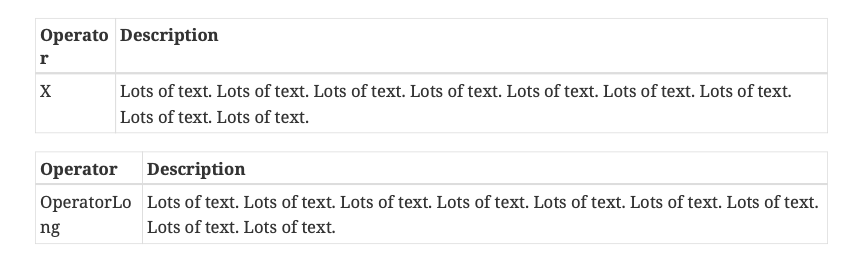
Thanks--this solution worked for some of my tables, but (sorry for the trouble), here are two similar tables for which it didn't work:[options="header,autowidth"] |======================================================================= |Operator |Description |X |Lots of text. Lots of text. Lots of text. Lots of text. Lots of text. Lots of text. Lots of text. Lots of text. Lots of text. |=======================================================================The output exhibits the same problem: "Operator" is split across two lines, with the second "r" on a line by itself.
I read the referenced github issue and tried to solve the problem by inserting non-breaking spaces following the "X", but that didn't (seem) to work.
The second example... If a single-word, non-header column cell is long, then it gets wrapped. For example,[options="header,autowidth"] |======================================================================= |Operator |Description |OperatorLong |Lots of text. Lots of text. Lots of text. Lots of text. Lots of text. Lots of text. Lots of text. Lots of text. Lots of text. |=======================================================================Output of these two cases is shown below:
Maybe there are work-arounds for these...?
Tim
If you reply to this email, your message will be added to the discussion below:https://discuss.asciidoctor.org/Problem-using-Asciidoctor-PDF-to-format-wide-autowidth-table-header-cells-tp7220p7224.htmlTo start a new topic under Asciidoctor :: Discussion, email [hidden email]
To unsubscribe from Asciidoctor :: Discussion, click here.
NAML
--
Dan Allen | @mojavelinux | https://twitter.com/mojavelinux
| Free forum by Nabble | Edit this page |