Re: Problem using Asciidoctor-PDF to format wide autowidth table header cells
Posted by jtkorb on
URL: https://discuss.asciidoctor.org/Problem-using-Asciidoctor-PDF-to-format-wide-autowidth-table-header-cells-tp7220p7224.html
Thanks--this solution worked for some of my tables, but (sorry for the trouble), here are two similar tables for which it didn't work:
The second example... If a single-word, non-header column cell is long, then it gets wrapped. For example,
EDIT 1: I was able to work around the problem by adding two-four {nbsp}s to the longer cell.
EDIT 2: Actually, using {nbsp} doesn't always work, since the padded cell looks like it spans multiple lines, throwing off the vertical alignment in the row.
Tim
URL: https://discuss.asciidoctor.org/Problem-using-Asciidoctor-PDF-to-format-wide-autowidth-table-header-cells-tp7220p7224.html
Thanks--this solution worked for some of my tables, but (sorry for the trouble), here are two similar tables for which it didn't work:
[options="header,autowidth"]
|=======================================================================
|Operator |Description
|X |Lots of text. Lots of text. Lots of text. Lots of text. Lots of text. Lots of text. Lots of text. Lots of text. Lots of text.
|=======================================================================
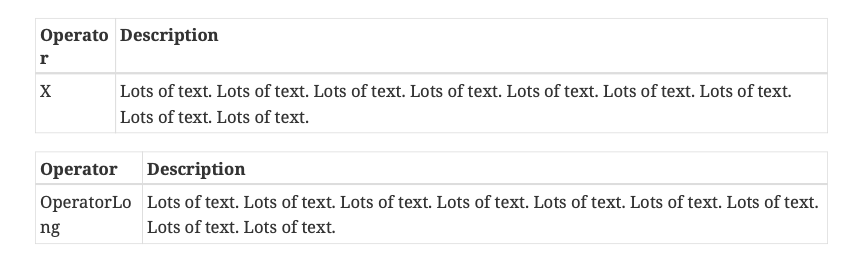
The output exhibits the same problem: "Operator" is split across two lines, with the second "r" on a line by itself.
The second example... If a single-word, non-header column cell is long, then it gets wrapped. For example,
[options="header,autowidth"]
|=======================================================================
|Operator |Description
|OperatorLong |Lots of text. Lots of text. Lots of text. Lots of text. Lots of text. Lots of text. Lots of text. Lots of text. Lots of text.
|=======================================================================
Output of these two cases is shown below:
EDIT 1: I was able to work around the problem by adding two-four {nbsp}s to the longer cell.
EDIT 2: Actually, using {nbsp} doesn't always work, since the padded cell looks like it spans multiple lines, throwing off the vertical alignment in the row.
Tim
| Free forum by Nabble | Edit this page |